


e-motion® M25
2.810.00 Reviews
App Specs
- Version
- 2.7.0.3
- Updated On
- License
- Free
- Downloads
- 10,000+
- Developer
- Alber GmbH
- Categories
- Medical
- Platform
- Android, iOS
Screenshots
 Analysis by AppCompare
Ever wondered how to make your wheelchair experience a tad more thrilling? Enter the e-motion® M25, an app that’s designed to amp up your mobility game with ease and innovation. Here’s my take on this nifty companion after having spent some quality time with it.
First, make sure it fits your mobility setup
The first question I’d ask before downloading is whether you use the e-motion M25 power-assist system. This is not a general wheelchair control app or a replacement for a chair’s own controls; its value depends on having the compatible equipment to connect to. If you use a manual chair without that system, or a different assist setup, it is unlikely to be useful in your daily routine.
That distinction also helps set expectations. Medical apps often cover broad needs such as reminders, records, or health information. This one is much more specific: it is a companion for interacting with a particular mobility system. I’d choose it for device-related access and management, not as a general health tracker or a way to plan routes.
Where setup can feel less simple
Installing an app can be quick while getting a useful connection still takes a little care. I’d begin with the phone near the wheelchair, check that the assist system is ready to connect, and follow the app’s on-screen prompts rather than tapping through them in a hurry. If the connection does not appear immediately, closing and reopening the app and checking the phone’s wireless connection are sensible first steps.
It is also worth separating setup from operation. A pairing problem is different from a command that does not behave as expected once connected. I would avoid making changes while moving: stop somewhere safe, check the connection and settings, and only resume when the controls are behaving as expected. That small habit matters more here than it would in an ordinary utility app.
Build a calm everyday workflow
A useful routine is to check the system before leaving, rather than waiting until you are already on the move. For example, before heading out for an appointment, I’d confirm the phone is connected, review the assist setting, and check the battery information while stationary. That gives you time to notice a problem without having to troubleshoot at a crossing, in a crowded entrance, or when you are already running late.
For a longer outing, I would treat the phone display as a helpful reference, not as the only source of truth. Battery estimates and trip information can make planning easier, but a phone app is still one part of the overall setup. Keep your normal habits for checking the wheelchair and its power-assist system, and do not depend on a displayed estimate as a guarantee that the system will cover a particular journey.
Worth Reading Before You Choose

Flipboard Shows What News Apps Must Do Beyond the Feed

Switching to Android Auto Means Rethinking Your Driving Routine

Google Calendar Makes a Crowded Week Easier to Manage

Ludo King Makes the Most of the Minutes Between Plans

Baby Panda World Brings Quick Play to Modern Phones, but Its Game Library Feels Busy

ESPN’s Live Game View Makes Following Close Games Easier
The practical recovery steps are deliberately simple: stop in a safe place, check that the phone and assist system are still connected, reopen the app if its display seems stuck, and use the equipment’s normal controls if the app is unavailable. If a warning or fault remains, follow the guidance for the wheelchair system or contact the appropriate support channel instead of repeatedly changing settings to see what happens.
What the app can and cannot solve
A phone connection can make system information easier to reach, but it cannot correct every issue that feels like an app problem. A low or changing battery reading, for instance, may reflect the system’s condition rather than a display failure. Likewise, a physical issue with the wheelchair or assist equipment needs attention as equipment, not repeated app troubleshooting.
That is why I would use the app as a convenient companion rather than a safety guarantee. Its usefulness is strongest when the underlying system is working normally and you want access to settings or information without relying on memory. If the chair behaves unexpectedly, prioritize safe use and the equipment’s own instructions over experimenting with phone controls.
Getting Started with e-motion® M25
So, the first thing I did was head over to the app store and download e-motion® M25. Installing it was a breeze, and I was up and running in no time. The interface? Super intuitive. I’m talking about a layout that even my tech-challenged uncle could navigate without breaking a sweat.
Features That Make a Difference
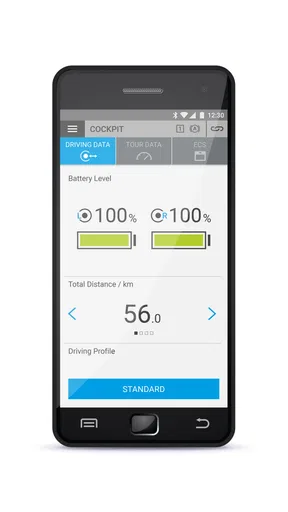
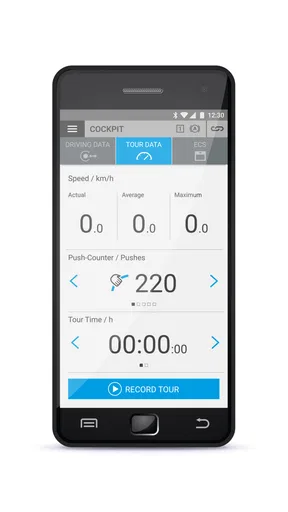
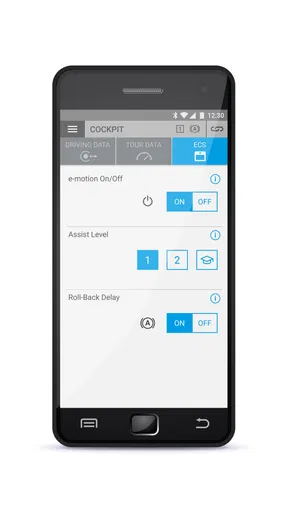
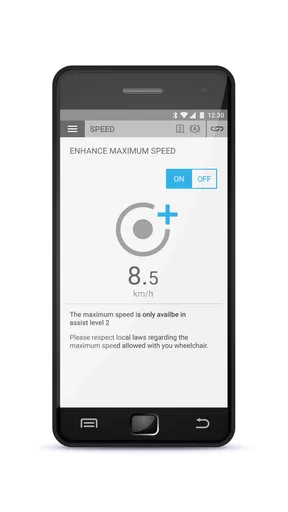
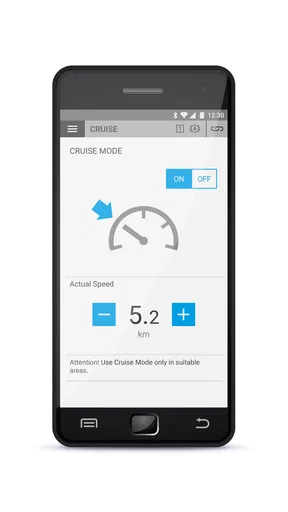
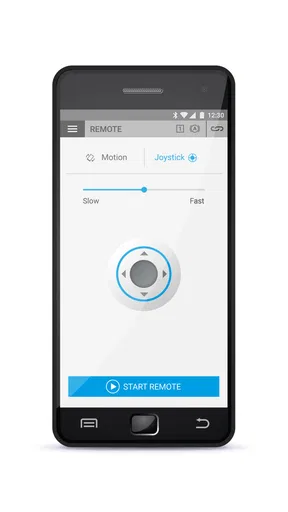
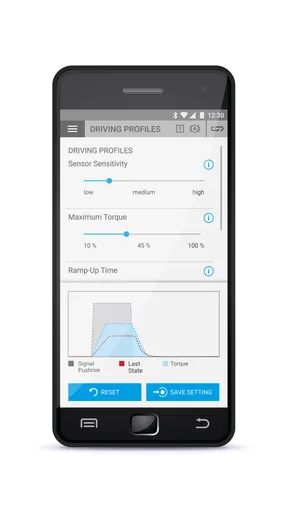
Let’s dive into the standout features. One of the coolest aspects is the app’s ability to connect seamlessly to your wheelchair’s power assist system. It’s like having a personal assistant that’s always on point. You can customize speed settings, monitor battery life, and even track your travel stats—all with a few taps. It’s like having your wheelchair’s dashboard right on your phone!
Another highlight? The app’s safety features. You can set anti-theft alarms, ensuring your wheelchair stays just where you left it. Plus, there’s a diagnostic tool that helps you troubleshoot any issues before they become a headache. Talk about peace of mind!
Performance and Usability
In terms of performance, the e-motion® M25 app doesn’t disappoint. The connection is stable, and commands are executed in real time. Whether you're adjusting the power assist level or checking your trip data, the app responds swiftly. It’s clear that the developers put a lot of thought into minimizing lag and maximizing user experience.
Usability is another area where this app shines. The interface is clean, uncluttered, and user-friendly. The icons are self-explanatory, and everything is just a tap away. It doesn’t require a steep learning curve, which is always a plus in my book.
Choosing it for the right reasons
In my view, the key trade-off is specialization. A basic phone note or a general medical app may be better if all you need is a place to record appointments, symptoms, or reminders. Neither offers the same direct relationship with an e-motion setup, but they also do not ask you to manage a device connection. I’d install this app for access to the wheelchair system, not simply because it sits in the medical category.
It may also suit a caregiver who helps prepare a chair before an outing, provided the wheelchair user remains involved in decisions about settings and daily use. A useful handoff is to agree on the preferred setup before leaving, then use the app to check it while stationary. That is more practical than making an adjustment in the middle of a busy trip, when attention should be on the surroundings.
One less obvious way to get value from the trip information is to use it as a personal comparison tool. Looking back at journeys can help you notice whether a familiar route feels different from one day to another, or whether your usual outing is taking more effort. I would treat those observations as prompts for reflection, not medical conclusions or proof that a component is failing.
Limitations worth weighing
The app is free to download, but its usefulness is tied to compatible hardware, and the listed in-app purchases are priced at $284.99 per item. I would check what any purchase covers before proceeding and avoid assuming it is necessary for basic use. The average rating is 2.8 from around 170 ratings, so I would approach the experience with realistic expectations rather than assuming every phone and setup will behave identically.
Its audience is focused, too. People who want broad health tracking, medication reminders, or wheelchair-independent accessibility tools should look elsewhere. The app is rated for everyone, but that does not mean every feature is relevant to every person; the practical fit depends on the equipment and the user’s needs. The developer is Alber GmbH, and the current version is 2.7.0.3, with Android 7.0 as the minimum operating system requirement.
What I Loved and What Could Be Better
Alright, let’s get into the nitty-gritty. What I absolutely love about the e-motion® M25 is how it empowers users to take control of their mobility. The ability to customize and monitor your travel experience is liberating. Plus, the app’s design is sleek and modern, which makes using it a pleasure rather than a chore.
However, no app is perfect. While the e-motion® M25 packs a punch with its features, I noticed that the battery monitoring could be more precise. Sometimes, the app’s estimation was a bit off, which could be improved in future updates. Also, while the app is generally intuitive, a more detailed help section could benefit newcomers.
Final Thoughts
Wrapping it up, the e-motion® M25 is a game-changer for wheelchair users looking to enhance their mobility experience. It’s packed with practical features that are both innovative and user-friendly. Despite a few minor hiccups, the app’s positives far outweigh its negatives.
If you’re seeking a way to add a little more freedom and functionality to your day-to-day adventures, give the e-motion® M25 a spin. Trust me; it’s worth the download!
Pros
- Easy to attach to most wheelchairs.
- Offers smooth and silent operation.
- Lightweight design aids portability.
- Long-lasting battery life.
- Supports various terrains smoothly.
Cons
- Price point may be high.
- Requires regular maintenance.
- Limited compatibility with older models.
- Battery recharge takes time.
- May require installation assistance.
FAQs for e-motion® M25
What is the e-motion® M25 app used for?
The e-motion® M25 app is designed to enhance the functionality of the e-motion® M25 power assist wheels for wheelchairs. It provides users with the ability to customize wheel settings, monitor battery status, and access real-time data to optimize performance. The app acts as a bridge between the user and their mobility device, offering a more personalized experience.
Is the e-motion® M25 app compatible with all smartphones?
The e-motion® M25 app is compatible with most modern Android and iOS devices. However, users should ensure their smartphone meets the minimum operating system requirements specified by the app. It is recommended to check the app store listing for compatibility details to ensure full functionality and avoid potential issues.
What features does the e-motion® M25 app offer?
The e-motion® M25 app offers a variety of features, including the ability to adjust driving parameters, view live data on speed and distance, and check the battery status of the e-motion® M25 wheels. Additionally, it provides access to user manuals and customer support options, making it a comprehensive tool for wheelchair users.
How secure is the e-motion® M25 app?
The e-motion® M25 app prioritizes user security by implementing robust encryption protocols to protect data transmission between the app and the device. Users are advised to keep their app updated to the latest version to ensure all security features are current and effective. It's important to review the app’s privacy policy for detailed information on data handling.
Do I need an internet connection to use the e-motion® M25 app?
An internet connection is not required for basic functionalities such as adjusting settings and monitoring wheel status, as these are managed via Bluetooth. However, accessing certain features, such as downloading updates or contacting customer support through the app, will require an internet connection. Users can enjoy core features offline while using advanced options online.


